
HeroMachine 3 Phoenix Edition is a complete ground-up rebuild of the classic character creator. The original Flash version died when browsers dropped plugin support, so Phoenix Edition brings it back as a modern web app that runs everywhere, with every original feature intact plus dozens of new ones.
Here’s what’s new.
Runs Everywhere, Forever
The original HeroMachine 3 required Adobe Flash, a browser plugin that every major browser discontinued in 2020. Phoenix Edition is built entirely on open web standards like HTML, SVG, and JavaScript. That means:
- No plugins required: works in Chrome, Firefox, Safari, Edge, and every other modern browser
- Mobile and tablet support: create characters on your phone or iPad
- Will never be deprecated: built on the same standards that power every website
- Faster loading: item art loads on demand instead of one massive upfront download
Direct Canvas Manipulation
In the Flash version, moving and transforming items meant typing numbers into sliders. Phoenix Edition lets you work directly on the canvas:
- Drag to move any item on the canvas
- Shift+drag to scale – pull away from the item to enlarge, push toward it to shrink
- Alt+drag to rotate (Option+drag on Mac)
- Scroll wheel for quick rotate and scale
- Arrow keys to nudge items pixel by pixel
If you prefer the classic slider-only workflow, you can disable canvas actions in Preferences.
Shareable Character Links
Created a character you want to show off? Click Copy Link and you’ll get a URL that contains your entire character. Paste it in a forum post, email, or chat; anyone who clicks it opens a live, editable version of your character in their browser. No account required, no file to download.
Full Screen Mode
The original Flash version was locked to a small fixed canvas. Phoenix Edition has a Full Screen button (bottom-left corner) that takes over your entire screen just like a YouTube video. More room to work, more detail to see.
Keyboard Shortcuts
- Cmd+Z / Ctrl+Z: Undo
- Cmd+Shift+Z / Ctrl+Shift+Z: Redo
- Delete / Backspace: Remove selected item
- Arrow keys: Nudge selected item
Import Your Old Characters
If you saved characters in the original Flash HeroMachine 3, you can bring them into Phoenix Edition:
- XML save files: load your exported .txt/.xml character files directly
- Flash save data (.sol files): import characters straight from your browser’s old Flash SharedObject storage, including files with multiple saved characters
Enhanced Layer Panel
The layer panel has been completely redesigned. Each row now shows:
- Visibility toggle (eye icon): hide items without deleting them
- Color preview swatches for each item
- Mask and duplicate indicators
- Drag-to-reorder: rearrange layers by dragging rows directly
Preferences & Themes
Click the gear icon in the bottom bar to open the Preferences panel:
- 4 UI themes: Dark (default), Light, HeroMachine 2 (steel blue), and HM Classic (bronze/olive)
- Slot sort order: alphabetical or rendering order (back-to-front)
- Canvas actions toggle: enable or disable drag/scale/rotate on the canvas
- Item info on hover: show item name and slot when you mouse over canvas items
- Transform around item center: rotate and scale items around their visual center instead of the slot anchor point
- Inherit transforms in Multiples: new items automatically inherit the colors and transforms of the last item in the slot
Better Saves & Exports
- Tabbed Save/Load panel: organized into Save Data, Save Image, Load Character, and Import Character
- Export current view: save exactly what you see on the canvas as an image
- Export All / Import All: back up every saved character as a single file, restore them anywhere
- Persistent color swatches: save colors to specific slots; they stay across sessions
Resizable Control Panel
Drag the left edge of the control panel to make it wider or narrower. A wider panel shows more item thumbnails per row. Your preferred width is saved automatically.
In-App Help
Phoenix Edition includes a built-in searchable help system – click the ? button to open it. The original Flash version had no built-in help at all because Jeff is a stereotypical developer with an aversion to documentation.
New Items
Phoenix Edition launches with a brand-new Roman-themed item set and several other additions:
Roman Collection
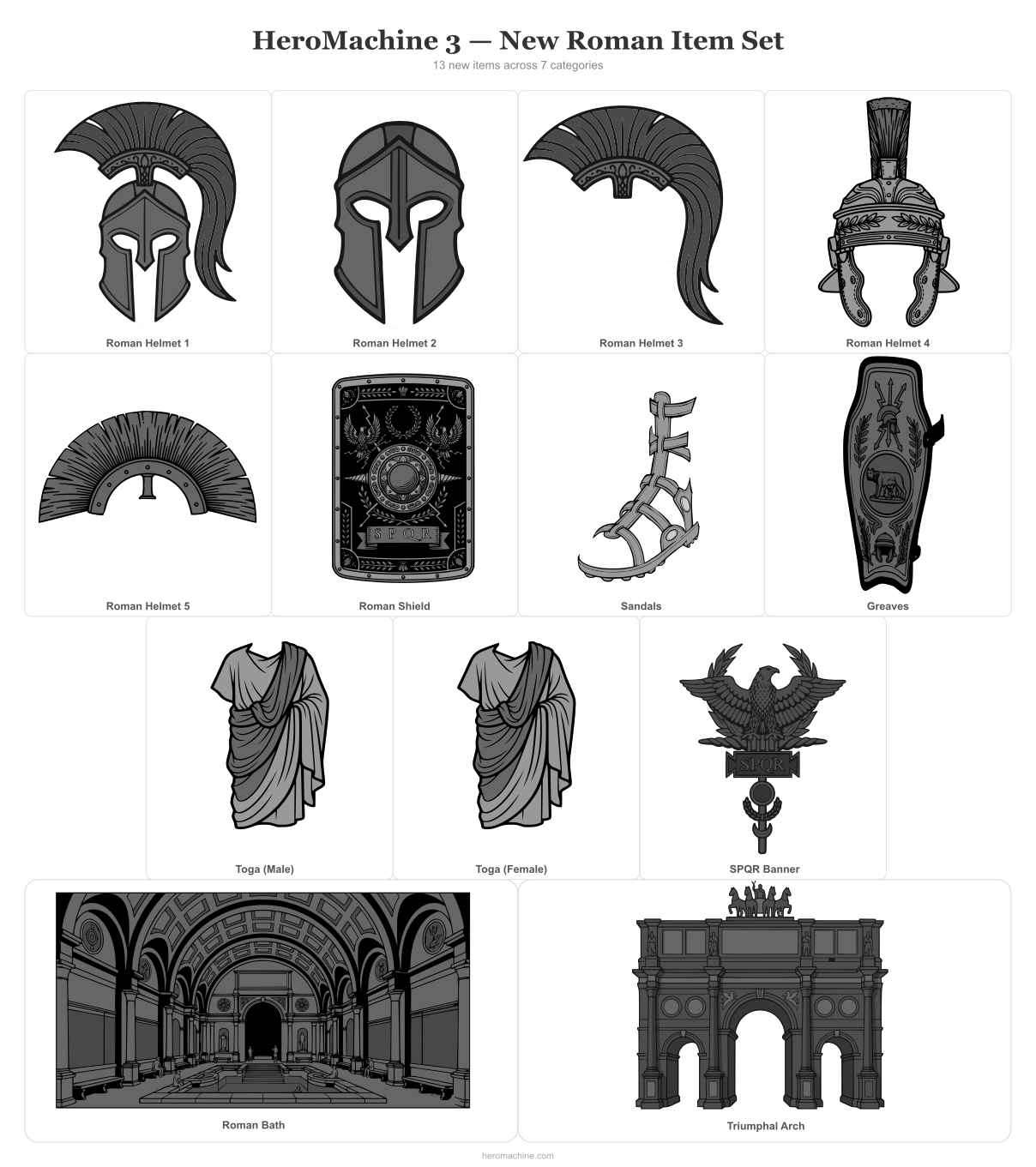
- 5 Roman centurion and legionary helmets
- Roman scutum shield
- SPQR eagle standard (aquila)
- Male and female togas
- Gladiator sandals
- Legionary greaves (shin guards)
- Triumphal arch background
- Roman bath interior background
Other New Items

- Energy eyes (glowing eye effect)
- Energy blast
- 14 modern warrior boots
- 10 standalone kneepads (extracted from boot designs for mix-and-match flexibility)
Item Parity Fixes
Hundreds of items that previously existed for only one hand, foot, or shoulder now have matching left/right counterparts.
Everything You Remember, Plus More
Every feature from the original HeroMachine 3 is here: randomize, starter templates, view modes (portrait, landscape, cover), the paint brush, Color All Skin, Color All Hair, item-to-item masking, the pattern system, undo/redo, and the full library of thousands of items across 30 equipment slots. Phoenix Edition keeps everything that worked and builds on it.
