Category Archives: HeroMachine 3

HM3: Transparent PNG

I’ve just added a third format option when exporting your character’s image in HM3 — “PNG (transparent 400×600)”. This is basically just adding in an option for the way it used to be.

When you click it, the size gets reset to 400×600, the Area gets reset to “Character”, and all other options are grayed out since you can’t make any of the other sizes or head shots export with transparency. Choosing regular old PNG or JPG turns them all back on, though.

This should help those, like DiCicatriz, who use the characters with transparent backgrounds to paste into an image editor for either larger group shots, or just to have in a custom setting.

Let me know if you run into any problems using it. All other options will continue to export with a white background.

HM3 Export options updated

I have very good news, and mildly bad news. The very good news is that I have just uploaded the latest update to the HeroMachine Alpha that allows you to output your creation at a wide variety of sizes, either as the full character or a portrait view, as a JPG or PNG, and in regular or widescreen format.

The mildly bad news is, saving as a PNG no longer puts your character on a transparent background — it’s a solid white. I tried to figure out a way around it, but given the various other constraints Flash put on me it was the only way to get output at anything but the basic size.

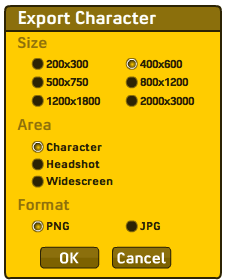
Here is the new menu, which you see now when you press either the “Save as JPG” or “Save as PNG” button:

If you have trouble seeing the images, the sizes are:

  • 200×300
  • 400×600
  • 500×750
  • 800×1200
  • 1200×1800
  • 1600×2400
  • 800×600 (widescreen)
  • 1280×1024 (widescreen)
  • 1600×1200 (widescreen)
  • 2048×1536 (widescreen)

My version of Flash has a maximum dimension limitation of something like 2800 pixels, so we couldn’t do the ridiculously ginormous size, just the mostly ginormous ones.

In laying all this out it didn’t make sense to have “widescreen” be a separate toggle button, so now the program just automatically does it all for you depending on which set of dimensions you choose.

I hope you like the new feature, and please let me know if you run into any problems with it. The larger sizes naturally take longer to render, so don’t be surprised if the pop up window just sits there for ten to thirty seconds thinking.

I didn’t touch the save/load code or anything else in this release except the export functions.

HM3: Oops

Much to my dismay I have just discovered that at least one of the major changes I made to HeroMachine 3 got lost somewhere in the file confusion I had a couple of days ago. I haven’t had the heart to check and see just how much of the bug fixing was destroyed. The backup I thought I had turned out to not be a backup, too. If I have to rewrite all the stuff I did last week … man, I might have to cry.

In the morning when I am feeling better I will look into it further, but that’s why all of a sudden things started coming up in the wrong slot, layers were hosed up, etc. It’s because only some of the fixes turned out to be in the version I uploaded. I don’t know what happened … there was a weird episode where one of the working versions didn’t load, and I renamed and reloaded some backups, and then … I don’t know. Feh.

More to come tomorrow when I know more. This sucks. But hopefully I can get it fixed sooner rather than later.

HM3: Export options

I’m currently working on adding options for how you want to export your character image, and this is the dialog box I have so far:

How do those sizes grab you? The 200×300 size I figure will mostly be used for portrait views, so you can have a handy image for using as a forum avatar, for instance. Should I have something similar intended for widescreen use? What size would that be?

Note that I am not 100% sure I can actually do all of this, especially exporting as portrait and widescreen, but I figure it’s better to start out aiming for the stars.

HM3: Custom color saving

I’ve just updated the HeroMachine 3 Alpha so any custom colors and swatches your character has will now be both saved and loaded. Old characters saved prior to this release will not be affected in any way.

If you have a bunch of custom colors active, then you load a previously saved character, your current custom colors won’t be overwritten with white — only non-white custom colors from the saved character get applied. In other words, your custom palette doesn’t get wiped out by loading a save.

What that means is, you could in theory set up a whole suite of custom colors that you use a lot, and then save that “character” as something like “Jeff’s Custom Colors”. When you start a new session and character, the first thing you could do would be to load “Jeff’s Custom Colors”, and all the colors you’d saved would now be active. It’s a way of saving your palette between sessions.

I also changed the default size for “Save as JPG/PNG” to 500×750.

The “Save” box now goes away when you click “OK”.

Finally, I implemented a small bug fix where the custom color picker was showing on top of the save/load dialog box.

Please let me know if you have any problems with the release, and enjoy, all you custom color creators!

HM3: Major Save/Load code change now LIVE

I have just uploaded a fairly major change to the way HeroMachine 3 handles saving and loading characters, and how it masks and layers items. Details after the jump, but the take-away is that going forward you should have a lot fewer problems loading and saving. And hopefully the “stuck item” bug will go away too.

All of your previously saved characters should still be there, so you won’t lose anything. It all ought to just work better.

I also want to give a special shout-out to everyone who contributed in the last thread on this subject, you all helped a lot. Particular thanks go to Violet, who sent me her saved-character .sol file, and Panner, who gave some exceptionally helpful, detailed, and specific bug reports that were incredibly helpful for tracking down all this. Thanks a ton!

Continue reading

HM3: Load/Save issues

I’m making progress on de-buggifying the load/save functions of HM3. I cleaned up some of the layering issues and an odd bug where if you had an item with a pattern assigned to it, and then tried to load a character who also had that same item with a pattern, the load would fail and all the layers would be totally hosed up.

But, before I go on, I wanted to ask what other big bugs you’ve had with loading and saving that I need to be aware of, so please let me know in the comments what you’ve encountered.

HM3: Coding updates and changes

I wanted to make sure you all know that I am currently starting on the Great Code Rewrite. And I want you to know that because when the next release goes live, your old save files may or may not work. That’s the problem with using alpha or beta software; when things change, they might change in a big, big way.

Now, what’s more likely to happen is that when you load an old character in the new setup, the layers might be all messed up. Although that happens now, too. Or, it might be that everything stays the same with regards to saving and loading, I just don’t know yet. But it’s a possibility, and I want to be sure you’re aware of it so you can be sure to have JPG or PNG backup hard copies of your favorite guys and gals.

You can also make a backup copy of the .SOL files that Flash uses to save your guys. I’ll probably keep the old (current) alpha version “live” for a little while under another name (so heromacine3a.swf or something). If I do that, then you should be able to go in and change the directory name where these .SOL files are kept to that name and still be able to access your characters.

To refresh, here’s the info on how the saving works currently:

The saved Flash shared object library files (.sol for you Windows users) are LIKE cookies, but they are NOT actual cookies. They are not stored in the shared internet data files and will not be deleted if you erase all your cookies. You can only remove them by right-clicking on the movie, and going to Flash Settings, removing them there.

Violodion found them in his Windows installation at %AppData%MacromediaFlash Player#SharedObjects\www.heromachine.comhm3

He was able to copy those and move them to another computer in the same directory and load his characters there.

On my Mac they are in HD / User / / Library / Preferences / Macromedia / Flash Player / #SharedObjects / / https://www.heromachine.com / hm3 / heromachine3.swf / hmcharacters.sol

HM3: Graveyard

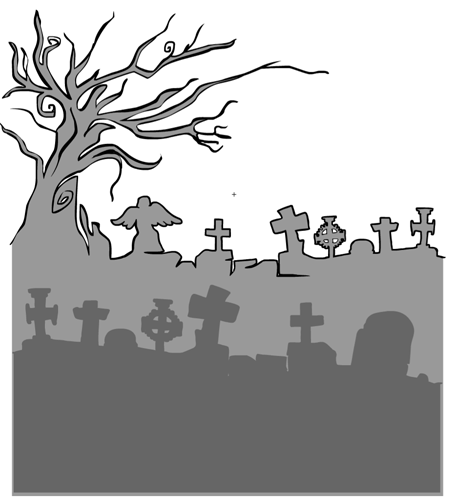
I had some trouble with the next item on the Replacement Prize list, which PapaKrok requested for winning Character Contest 51. It was “spooky graveyard background”, and this is what I came up with (now in Background-Standard):

Part of the problem is, if you get too complicated then the two-color limit really hits you hard. So I settled on doing something more abstract that hopefully will serve as a good backdrop for adding in other spooky bits to create the exact scene you want.

Update: Here’s the Replacement Prize list:

Continue reading

HM3: Snake mouths and banners

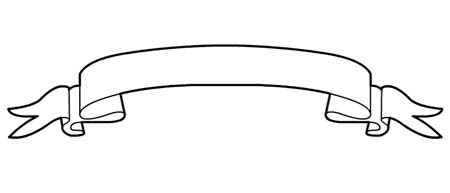
I just added the following item to Background-WordBalloons:

And the last three of these snake-like bits to Mouth-Standard as BakerDoc’s prize for winning Character Contest 56:

Enjoy!